<?xml version="1.0" encoding="utf-8"?>
<feed xmlns="http://www.w3.org/2005/Atom">
	<title type="html"><![CDATA[Infinity Code Forum — Real distance conversion]]></title>
	<link rel="self" href="https://forum.infinity-code.com/extern.php?action=feed&amp;tid=927&amp;type=atom" />
	<updated>2018-10-30T20:34:04Z</updated>
	<generator>PunBB</generator>
	<id>https://forum.infinity-code.com/viewtopic.php?id=927</id>
		<entry>
			<title type="html"><![CDATA[Re: Real distance conversion]]></title>
			<link rel="alternate" href="https://forum.infinity-code.com/viewtopic.php?pid=4130#p4130" />
			<content type="html"><![CDATA[<div class="quotebox"><blockquote><p>Vector2 direction = (pointB - pointA).normalized;</p></blockquote></div><p>This is wrong, because latitude and longitude exist for a sphere or an ellipsoid. <br />The map is flat and in the Mercator projection. <br />So you need to first convert the coordinates to the Mercator projection or to the tile position, which is almost the same.</p><div class="quotebox"><blockquote><p>A tile position ?</p></blockquote></div><p>Marker3D.GetTilePosition <br />or<br />OnlineMaps.instance.projection.CoordinatesToTile</p><div class="quotebox"><blockquote><p>So it is a precision issue because of the conversion from double to float ?</p></blockquote></div><p>If Step is big enough, then it doesn&#039;t matter that you use a float. <br />If Step is small, use double.</p>]]></content>
			<author>
				<name><![CDATA[Alex Vertax]]></name>
				<uri>https://forum.infinity-code.com/profile.php?id=2</uri>
			</author>
			<updated>2018-10-30T20:34:04Z</updated>
			<id>https://forum.infinity-code.com/viewtopic.php?pid=4130#p4130</id>
		</entry>
		<entry>
			<title type="html"><![CDATA[Re: Real distance conversion]]></title>
			<link rel="alternate" href="https://forum.infinity-code.com/viewtopic.php?pid=4129#p4129" />
			<content type="html"><![CDATA[<p>Vector2 direction = (pointB - pointA).normalized;</p><p>with PointA &amp; PointB being Marker3D.position of the the center point and the one i&#039;m dragging.</p><p>&quot;You need to first convert the geographic coordinates into a tile position, and then calculate the offset.&quot;</p><p>A tile position ?<br />Do you mean that instead of using a vector2 &quot;Marker3D.position&quot; i should use 2 doubles, result of &quot;Marker3D.GetTilePosition&quot; ?</p><p>So it is a precision issue because of the conversion from double to float ?</p>]]></content>
			<author>
				<name><![CDATA[Thibault]]></name>
				<uri>https://forum.infinity-code.com/profile.php?id=821</uri>
			</author>
			<updated>2018-10-30T20:12:39Z</updated>
			<id>https://forum.infinity-code.com/viewtopic.php?pid=4129#p4129</id>
		</entry>
		<entry>
			<title type="html"><![CDATA[Re: Real distance conversion]]></title>
			<link rel="alternate" href="https://forum.infinity-code.com/viewtopic.php?pid=4128#p4128" />
			<content type="html"><![CDATA[<p>What is the direction in your scripts?<br />Coordinate offset between the center point and the point that you drag?<br />If yes, then this is not the correct way.<br />You need to first convert the geographic coordinates into a tile position, and then calculate the offset.</p><p>FixAngle clamps the latitude and repeats the longitude.</p>]]></content>
			<author>
				<name><![CDATA[Alex Vertax]]></name>
				<uri>https://forum.infinity-code.com/profile.php?id=2</uri>
			</author>
			<updated>2018-10-30T19:38:37Z</updated>
			<id>https://forum.infinity-code.com/viewtopic.php?pid=4128#p4128</id>
		</entry>
		<entry>
			<title type="html"><![CDATA[Re: Real distance conversion]]></title>
			<link rel="alternate" href="https://forum.infinity-code.com/viewtopic.php?pid=4127#p4127" />
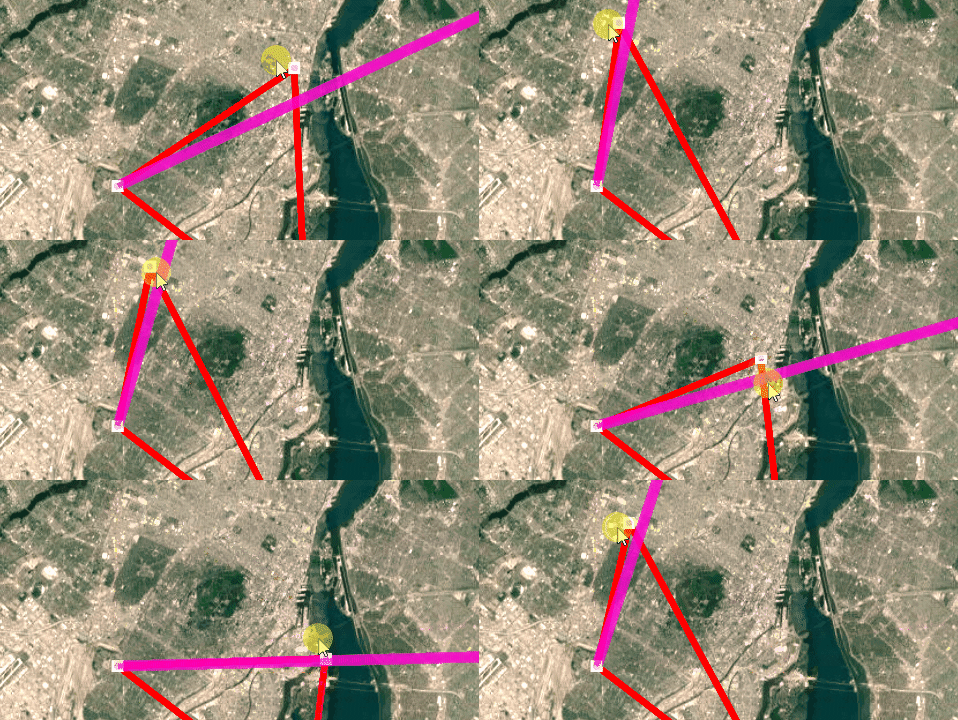
			<content type="html"><![CDATA[<p>So i&#039;m having a hard time using this function. <br />See this GIF :</p><p><a href="https://media.giphy.com/media/Bq60rkWEqAGI4grgka/giphy.gif">https://media.giphy.com/media/Bq60rkWEq … /giphy.gif</a></p><p>The pink line is a succession of Marker 3D that have been positioned using OnlineMapsUtils.GetCoordinateInDistance.<br />Those Marker 3D are supposed to be on the red line. As you can see it is working with an angle of 0 or 90 degree from the north.</p><br /><p>Here is what i do :&nbsp; <br />double nlng, nlat;<br />float angleFromNorth;<br />angleFromNorth = Vector2.Angle(Vector2.up, direction);</p><p>and in a loop :</p><p> OnlineMapsUtils.GetCoordinateInDistance(waypointPlacer.x, waypointPlacer.y, Step, angleFromNorth, out nlng, out nlat);</p><p>//waypointPlacer += direction * Step; //What i used to do (it is perfectly working)</p><p>waypointPlacer = new Vector2((float)nlng, (float)nlat);</p><p>waypointMarker = OnlineMapsControlBase3D.instance.AddMarker3D(waypointPlacer, waypointPrefab);</p><br /><p>Could this be a problem caused by the fact that my lat/lng coordinates are stored in a vector2 (and so they are float instead of double, which cause precision lost ? ) </p><p>So on the bright side my waypoints have now a correct distance between each other, but they doesn&#039;t follow the right direction.</p><br /><p>PS: What does this function do exactly ?</p><p><a href="http://infinity-code.com/doxygen/online-maps/classOnlineMapsUtils.html#a019659cc142c35e26a67e9e6292fc96b">http://infinity-code.com/doxygen/online … e6292fc96b</a></p>]]></content>
			<author>
				<name><![CDATA[Thibault]]></name>
				<uri>https://forum.infinity-code.com/profile.php?id=821</uri>
			</author>
			<updated>2018-10-30T18:27:19Z</updated>
			<id>https://forum.infinity-code.com/viewtopic.php?pid=4127#p4127</id>
		</entry>
		<entry>
			<title type="html"><![CDATA[Re: Real distance conversion]]></title>
			<link rel="alternate" href="https://forum.infinity-code.com/viewtopic.php?pid=4125#p4125" />
			<content type="html"><![CDATA[<p>Oh nice ! Thank you</p>]]></content>
			<author>
				<name><![CDATA[Thibault]]></name>
				<uri>https://forum.infinity-code.com/profile.php?id=821</uri>
			</author>
			<updated>2018-10-30T17:18:00Z</updated>
			<id>https://forum.infinity-code.com/viewtopic.php?pid=4125#p4125</id>
		</entry>
		<entry>
			<title type="html"><![CDATA[Re: Real distance conversion]]></title>
			<link rel="alternate" href="https://forum.infinity-code.com/viewtopic.php?pid=4123#p4123" />
			<content type="html"><![CDATA[<p>Hello.</p><p>Most likely you are looking for OnlineMapsUtils.GetCoordinateInDistance.<br /><a href="http://infinity-code.com/doxygen/online-maps/classOnlineMapsUtils.html#a39d30128d6ca108021ffff48f4e0636b">http://infinity-code.com/doxygen/online … 48f4e0636b</a></p>]]></content>
			<author>
				<name><![CDATA[Alex Vertax]]></name>
				<uri>https://forum.infinity-code.com/profile.php?id=2</uri>
			</author>
			<updated>2018-10-30T16:03:20Z</updated>
			<id>https://forum.infinity-code.com/viewtopic.php?pid=4123#p4123</id>
		</entry>
		<entry>
			<title type="html"><![CDATA[Real distance conversion]]></title>
			<link rel="alternate" href="https://forum.infinity-code.com/viewtopic.php?pid=4122#p4122" />
			<content type="html"><![CDATA[<p>Hi</p><p>I want to place Marker 3D at regular interval between two locations (those are defined with&nbsp; Vector2(longitude, latitude) ) </p><p>Example: <br />nextLocation, currentLocation and direction are Vector2<br />Step is a float, representing the distance i want in meters</p><p>What i need to do is basically:&nbsp; Vector2 nextLocation = currentLocation + direction.normalized*step;</p><p>I know that this example ( <a href="http://infinity-code.com/atlas/online-maps/pages/RealTilesetSizeExample.html">http://infinity-code.com/atlas/online-m … ample.html</a> ) could be a part of a solution to perform this.<br />But somehow when i add this script to my Map GameObject it fucked up my scene. (i can&#039;t control the map anymore and all i see is a blurry tile).</p><p>Aniway i&#039;m pretty sure it would be better to just convert my&nbsp; &#039;Step&#039; variable from meters to game unit ? <br />Or, since my location point are (latitude / longitude) should i multiply &quot;Step&quot; with some Lat/Long constant i ignore (so finally my problem is not Unity-unit-related ?) </p><p>As you can see i&#039;m getting confused with the best approach to achieve this <img src="https://forum.infinity-code.com/img/smilies/yikes.png" width="15" height="15" alt="yikes" /></p>]]></content>
			<author>
				<name><![CDATA[Thibault]]></name>
				<uri>https://forum.infinity-code.com/profile.php?id=821</uri>
			</author>
			<updated>2018-10-30T15:46:57Z</updated>
			<id>https://forum.infinity-code.com/viewtopic.php?pid=4122#p4122</id>
		</entry>
</feed>
