<?xml version="1.0" encoding="utf-8"?>
<feed xmlns="http://www.w3.org/2005/Atom">
	<title type="html"><![CDATA[Infinity Code Forum — [SOLVED]Zoom in and zoom out]]></title>
	<link rel="self" href="https://forum.infinity-code.com/extern.php?action=feed&amp;tid=1838&amp;type=atom" />
	<updated>2021-09-15T08:50:36Z</updated>
	<generator>PunBB</generator>
	<id>https://forum.infinity-code.com/viewtopic.php?id=1838</id>
		<entry>
			<title type="html"><![CDATA[Re: [SOLVED]Zoom in and zoom out]]></title>
			<link rel="alternate" href="https://forum.infinity-code.com/viewtopic.php?pid=7706#p7706" />
			<content type="html"><![CDATA[<p>Thank you for the video.<br />This happened because you did not add any Controls, and this is a required component for the map to work.<br />I fixed the problem and in the next version the component won&#039;t break if Control is missing.</p>]]></content>
			<author>
				<name><![CDATA[Alex Vertax]]></name>
				<uri>https://forum.infinity-code.com/profile.php?id=2</uri>
			</author>
			<updated>2021-09-15T08:50:36Z</updated>
			<id>https://forum.infinity-code.com/viewtopic.php?pid=7706#p7706</id>
		</entry>
		<entry>
			<title type="html"><![CDATA[Re: [SOLVED]Zoom in and zoom out]]></title>
			<link rel="alternate" href="https://forum.infinity-code.com/viewtopic.php?pid=7705#p7705" />
			<content type="html"><![CDATA[<p><a href="https://streamable.com/mp1bvr">https://streamable.com/mp1bvr</a></p><p>Maybe its &quot;by design&quot;.... because I had no other components added</p>]]></content>
			<author>
				<name><![CDATA[zedexnz]]></name>
				<uri>https://forum.infinity-code.com/profile.php?id=1733</uri>
			</author>
			<updated>2021-09-15T02:30:01Z</updated>
			<id>https://forum.infinity-code.com/viewtopic.php?pid=7705#p7705</id>
		</entry>
		<entry>
			<title type="html"><![CDATA[Re: [SOLVED]Zoom in and zoom out]]></title>
			<link rel="alternate" href="https://forum.infinity-code.com/viewtopic.php?pid=7704#p7704" />
			<content type="html"><![CDATA[<p>Very interesting.<br />This is the first time a similar issue has been reported.<br />Please make a short video showing the components you have on the map GameObject.<br />I will check it.</p>]]></content>
			<author>
				<name><![CDATA[Alex Vertax]]></name>
				<uri>https://forum.infinity-code.com/profile.php?id=2</uri>
			</author>
			<updated>2021-09-14T23:49:10Z</updated>
			<id>https://forum.infinity-code.com/viewtopic.php?pid=7704#p7704</id>
		</entry>
		<entry>
			<title type="html"><![CDATA[Re: [SOLVED]Zoom in and zoom out]]></title>
			<link rel="alternate" href="https://forum.infinity-code.com/viewtopic.php?pid=7703#p7703" />
			<content type="html"><![CDATA[<p>Thank you Alex for the prompt response. I thought this would be the case, but for some reason the mouse zoom doesn&#039;t work within unity for testing and android build within windows. <br />*EDIT* I found that the issue is when using the &quot;Device Simulator&quot; plugin the scroll zoom doesn&#039;t work, but if switching to game it works as expected.<br />Also some odd issues with the sometimes when clicking the expanding out &quot;advanced&quot; as part of the &quot;Online Maps component&quot; doesnt display correctly and is hidden</p>]]></content>
			<author>
				<name><![CDATA[zedexnz]]></name>
				<uri>https://forum.infinity-code.com/profile.php?id=1733</uri>
			</author>
			<updated>2021-09-14T23:44:58Z</updated>
			<id>https://forum.infinity-code.com/viewtopic.php?pid=7703#p7703</id>
		</entry>
		<entry>
			<title type="html"><![CDATA[Re: [SOLVED]Zoom in and zoom out]]></title>
			<link rel="alternate" href="https://forum.infinity-code.com/viewtopic.php?pid=7701#p7701" />
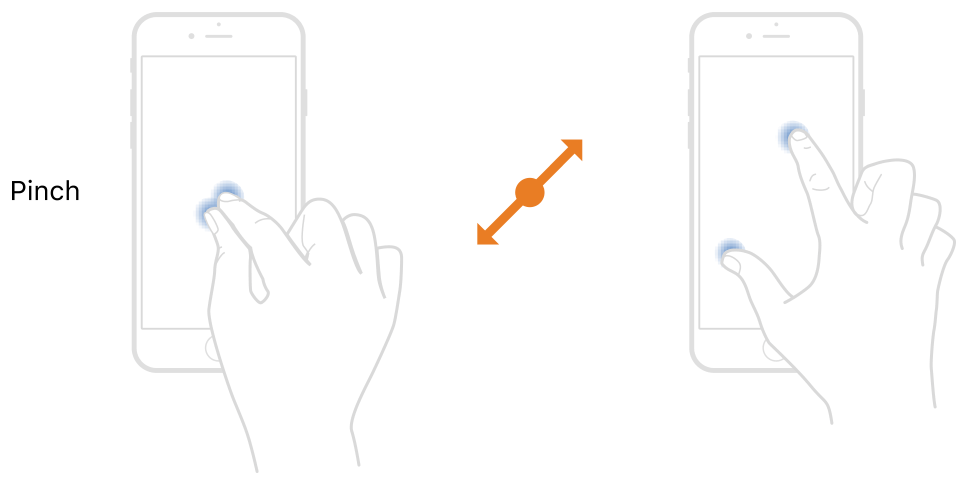
			<content type="html"><![CDATA[<p>Hello.</p><p>On Windows, you can use the mouse wheel.<br />On mobile devices, you can use the pinch gesture.<br /><a href="https://docs-assets.developer.apple.com/published/7c21d852b9/46733a3e-1a59-4ca3-acb3-dc14958374a7.png">https://docs-assets.developer.apple.com … 8374a7.png</a></p><p>Also, you can make the UI buttons, and change the zoom when clicking on these buttons (see ZoomArea example script).</p>]]></content>
			<author>
				<name><![CDATA[Alex Vertax]]></name>
				<uri>https://forum.infinity-code.com/profile.php?id=2</uri>
			</author>
			<updated>2021-09-14T22:59:48Z</updated>
			<id>https://forum.infinity-code.com/viewtopic.php?pid=7701#p7701</id>
		</entry>
		<entry>
			<title type="html"><![CDATA[[SOLVED]Zoom in and zoom out]]></title>
			<link rel="alternate" href="https://forum.infinity-code.com/viewtopic.php?pid=7700#p7700" />
			<content type="html"><![CDATA[<p>Apologies as I an very new to this, and have splashed out for this asset. Thus far it has made it very easy for me to integrate a simple map into my unit app, but I am struggling to work out how the zoom function works. I can double click to zoom in, if I tick that option, but I dont know how to zoom back out??</p><p>Obviously I am testing all this on within windows, before I deploy the app onto an android phone.</p><p>Any assistance would be appreciated. </p><p>Thank you</p>]]></content>
			<author>
				<name><![CDATA[zedexnz]]></name>
				<uri>https://forum.infinity-code.com/profile.php?id=1733</uri>
			</author>
			<updated>2021-09-14T22:39:38Z</updated>
			<id>https://forum.infinity-code.com/viewtopic.php?pid=7700#p7700</id>
		</entry>
</feed>